Dev Diary 28 – Committed to the UX
Hi hacknplanners!
HacknPlan 1.0.2 is here! This new update comes with many improvements in terms of usability, as well as a brand new integration for Personal Plus and Studio users: GitLab! Additionally, we fixed many bugs and improved the performance of some sections, among other things.
Let’s dive into the fun stuff!
Features and improvements
GitLab integration (Studio & Personal Plus)

If both HacknPlan and GitLab are part of your game development toolset, today is a good day for you; you can now integrate GitLab with HacknPlan to keep a link between tasks and the changes in the code related to them. Similarly to what we did with GitHub, you can integrate one or more GitLab repositories with your HacknPlan project; then, you just need to reference one or more HacknPlan tasks in the commit message (using #taskid) and those commits will be added to the Source Code tab of the task detail panel. You can read more about how to setup the GitLab integration at the documentation site.
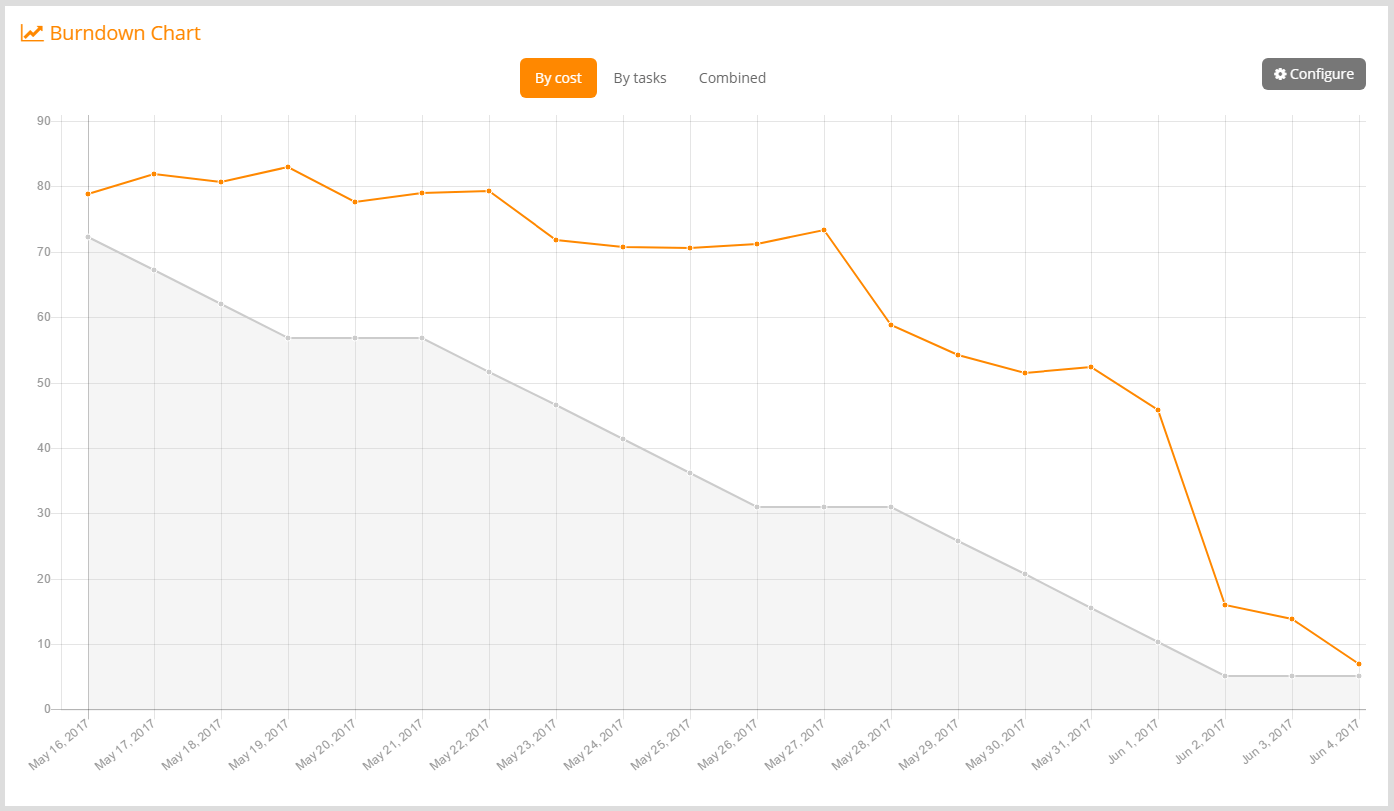
Weekdays and days off for the Burndown Chart (Studio):
You can now specify which days of the week you are working on your project (hopefully from Monday to Friday, which is the default config) and if there is any special date the team won’t be at work (like bank holidays, events…). We will use this information to draw a more realistic ideal line on the Burndown Chart which won’t lead to confusion. You can find this configuration in the project admin section, Timetable tab, also accessible from the Configure button on the Burndown Chart page.
Task references in Markdown:
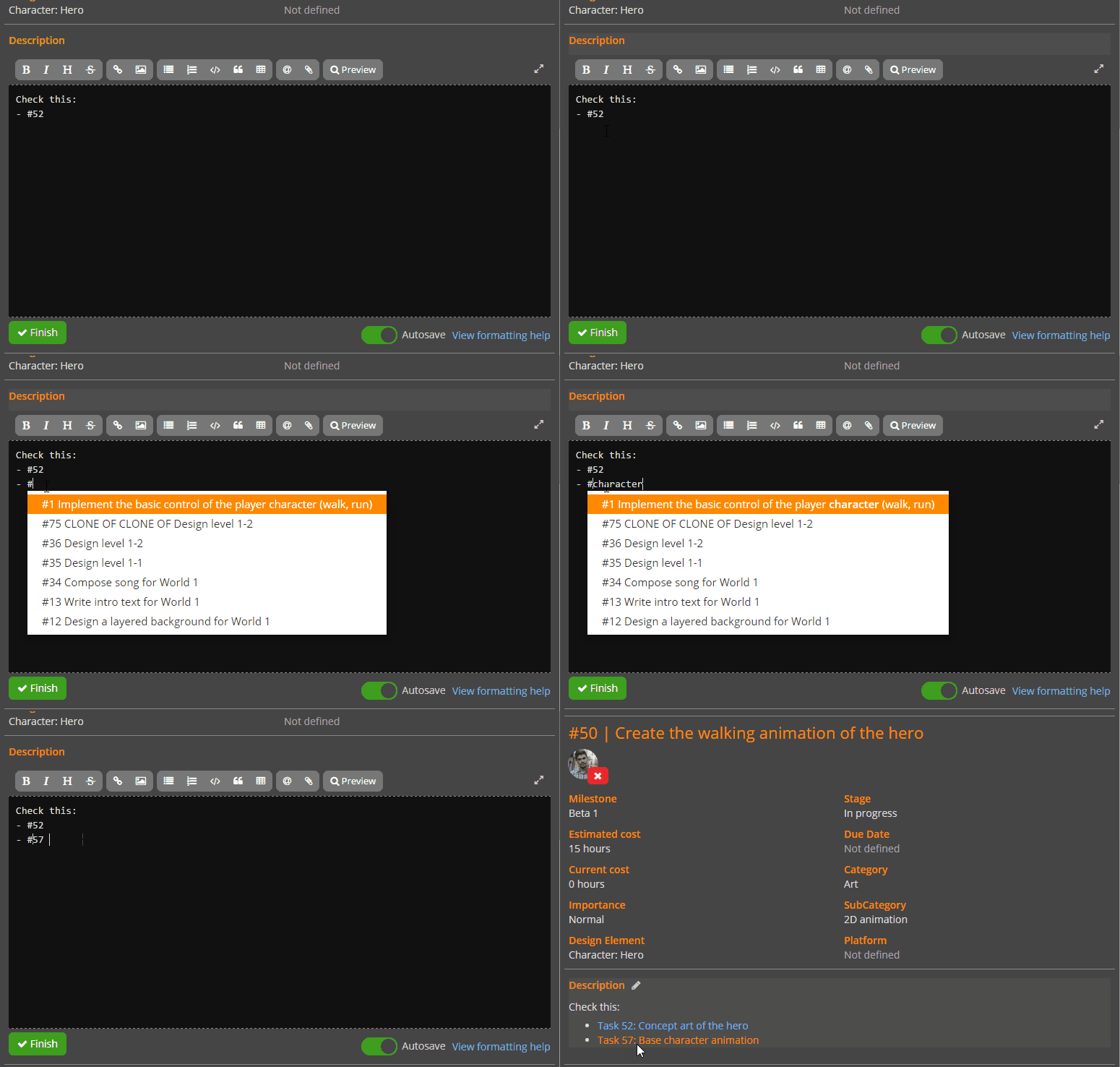
You can now reference tasks from markdown descriptions by writing # and the task ID (fi. #23), which will be rendered as a link to the task details. In order to help you find out the task ID you’re looking for, when you enter # on the markdown editor a list of tasks with autocomplete is displayed, so you just have to write a part of the task title, select with the directional keys, and press enter.
Game Design Model filtering:
In order to make finding a specific design element easier, we have added a text filtering functionality to both the main GDM section and the design element selector. This way, you just need to enter some text and the tree will be filtered showing elements that contain that text either in the type or the title.
Metrics; Remaining cost:
After lots of feedback about our metric system, which can be sometimes a bit confusing or not so intuitive depending on how you interpret the figures, we added a new one that some of you were missing: the remaining cost. While the unused cost shows the estimated cost minus the logged cost of the tasks included in the project, milestone or design element (meaning the cost that was allocated but not yet used), the remaining cost does the same subtraction but only for the tasks that are still open. This means this metric shows how many (theoretical) hours, days or points are left to complete the project, milestone or design element.
UX improvements:
We are working on improving the usability of the application as much as possible, iterating over the existing features to make them easier to user, more intuitive or just reduce steps to perform common actions:
- The task search functionality is automatic now, the results of the search are shown as you type.
- Setting dependencies is now easier than ever. You just need to start writing a part of the title or the ID of a task on the dependencies input box, and an autocomplete dropdown will help you choose and add the task you are looking for. You can add several dependencies in a row without leaving the keyboard.
- You can add and edit comments directly on the task panel, without having to open a popup dialog. This makes adding several comments in a row easier and quicker now. The comment editor (which is a full Markdown editor) can be shown and hidden at will, so it doesn’t take precious space when you are not adding comments.
- We have switched the position of the elements of the board header. The milestone selector is now on the left side, which makes more evident and intuitive the fact that the board is filtered by milestone, and also works as a title for the board.
- Before this update, when the milestone set as default (the star icon next to the name is filled) was closed or removed, no other milestone was set as default; this made the board go directly to the backlog. A lot of people was confused by this, so when the default milestone is closed or removed now, the most appropriate one (based on dates and sorting) is set as default automatically.
Other improvements:
- The cloning feature for the Game Design Model supports children elements now. This is very useful for defining common structures as templates and cloning them to create specific instances of them.
- We reduced some page redirections that caused flashing.
- Global performance improvements.
Bug fixes
- The stage was not displayed on the cards of the game design element task list.
- The Pending filter for game design element tasks didn’t work. It was hot-fixed on May 18th.
- The Estimated (current) metric on the category details wasn’t showing the right value. Hot-fixed on May 27th.
- There was no spinner on the Finish button on the board while completing the milestone.
- The Project section of the organization projects (Studio) took too long to load and was showing no spinner.
- The edition of comments was broken (the button was removed until fixing).
- The project creation date was not displayed anywhere.
- The grouping of the board by design element was displaying a wrong column layout on some scenarios.
- The comments of tasks in the backlog were duplicated sometimes (not really duplicated, only rendered twice).
What’s next?
We plan to add more improvements to the GDM, like comments on the design elements, a button to expand and collapse all elements on the tree, and the possibility of exporting the GDM into a classic game design document (Studio). We also plan to improve the current time display and input, so you don’t have to deal with weird time fractions (1h 15m instead of 1.25 hours). We are also evaluating some other ideas to make Scrum users more comfortable with the tool, like the concept of User Story and Sprint, we will give you more details about this very soon.
Is there any feature or integration you would like us to add? Don’t be shy and share it with us in the comments!
Happy planning!
