Boards
Boards and milestones
In HacknPlan, a board is a scoped set of work items intended for a defined period. Boards reduce complexity, create short-term goals, and provide measurable execution windows.
Boards can be date-based or date-free, but short timeboxed boards are strongly recommended to improve predictability and inspection cadence.
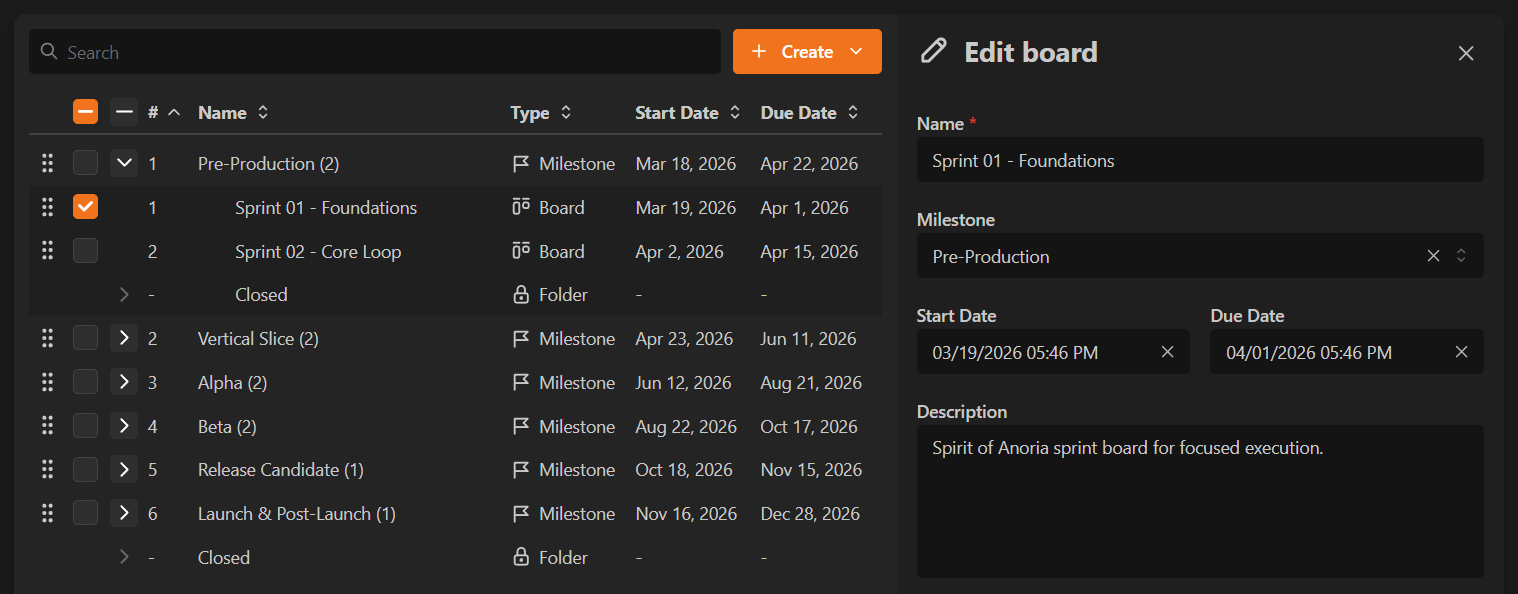
Creating a board
Create a board from:
Newin the left menu- keyboard shortcut
B Administration -> Boards & milestones
Main fields:
- Name: board identifier (for example, Sprint 5 or v0.9.0).
- Description: short summary shown in lists.
- Milestone: optional roadmap grouping.
- Start date: baseline date used for historical metrics.
- Due date: target completion date (informational).
- General info: extended Markdown notes.
Working with boards
During execution, teams typically use:
- the kanban board for day-to-day flow
- reports and dashboards for progress tracking
When the cycle ends, admins can close the board from:
Administration -> Boards & milestones- board actions menu on the kanban header
- board list quick actions
If open work remains, you can keep it, move it to another board, or send it to backlog.
Deleting a board can also delete its items, or move them to backlog if deletion is not selected.
Understanding board metrics
Board metrics compare planned scope and actual execution.
Work items
- Estimated (at start date): frozen baseline at board start if a start date exists.
- Estimated (current): current item count on board.
- Open: items not closed.
- Closed: items in a closed-status stage.
- Progress: closed ratio against pending/removed scope.
Cost
- Estimated (at start date): frozen effort baseline (time or points).
- Estimated (current): current effort scope.
- Logged: reported effort.
- Open: remaining estimated effort on open items.
- Closed: estimated effort already closed.
- Progress: completion based on baseline versus closed/removed effort.
Freezing start-date metrics protects historical reliability even if scope changes later.
