Projects
Adding your team
HacknPlan is built for collaborative production. You can add users to a project from:
Administration -> Users & permissions
Use the Add users button in the Users panel.
Personal vs Studio projects
Invitation flow depends on workspace type.
- Personal projects:
Invite by email address (single or list). Optional settings:
- send invitation email if user does not exist
- grant project administrator rights
- Studio projects: Add users from existing workspace members. In Studio, project users must belong to the workspace first.
Studio projects can also add entire teams using Add team.
Setting permissions (Pro only)
New users have full writting permissions by default in the free Personal tier, and read-only in Personal Plus and Studio.
Edit permissions by clicking the user row.
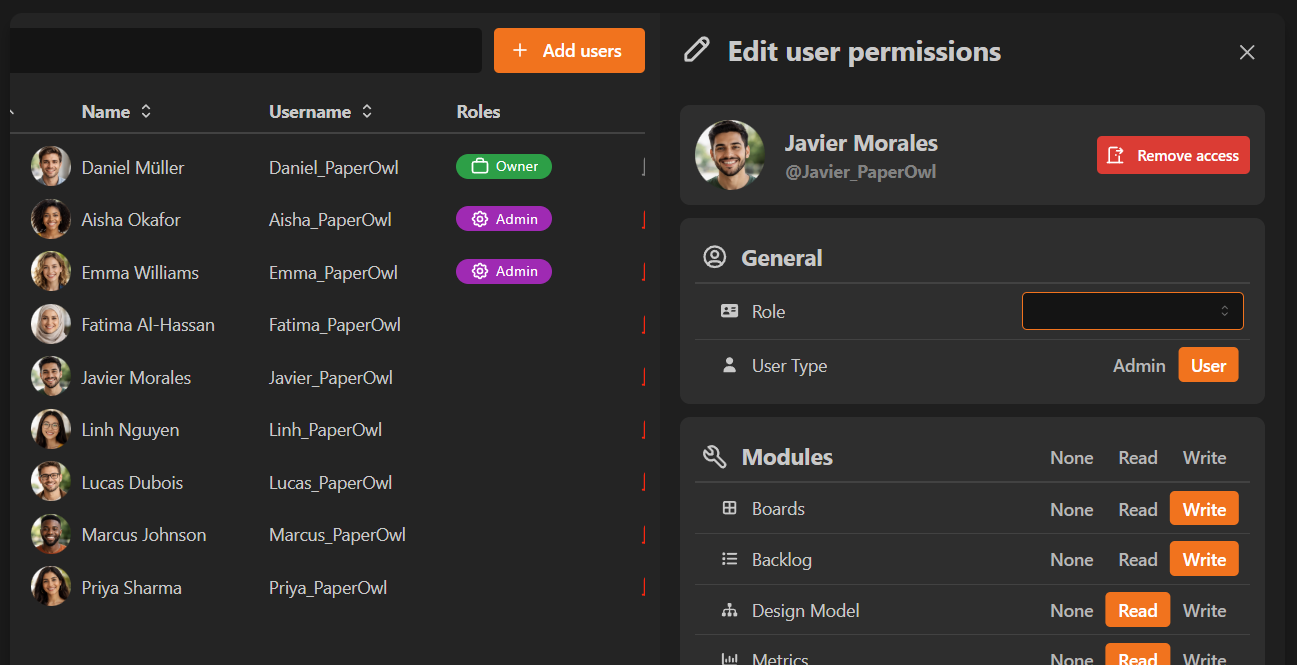
Module permissions determine the access level for different modules and sections of the project:
- No access: no visibility
- Read: view only
- Write: full create/edit/delete for that module
Category-level permission levels determine the access level for categories of work items (programming, art, design...):
- No access: no visibility
- Read: view only
- Update: limited execution updates on assigned items
- Write: full create/edit/delete for that category
Update is useful for restricted contributors. It supports actions such as:
- moving assigned tasks between stages
- updating logged cost/progress
- completing/reopening subtasks
- adding attachments and comments
Administration rights
You can also grant:
- Project admin rights (full project management capabilities)
Role-based permissions (Studio)
Studio admins can define reusable role templates in:
Administration -> Roles
Roles simplify onboarding by applying predefined permission sets.
Transfer ownership (Personal)
Project ownership can be transferred from the user permissions dialog.
See: Transfer project ownership
